Gameplay Additions is a Greencoast Studios mod for Railroader. It adds deeper steam and diesel handling, new brake stands, distributed power, smarter Auto Engineer crews, cab displays, character options and new track sounds. Most additions can be switched on or off from one in-game menu. Available to every Greencoast Studios Patreon member, at any tier: connect your membership in the Greencoast Studios Updater to install it. Current version: 0.16.176.
How to open the menu
Install with the Greencoast Updater. In Railroader, turn on Preferences > Features > Experimental > Allow Unsafe DLL Mods and tick Gameplay Additions in Manage Mods.
Open the menu from the Gameplay Additions button on the main or pause menu, the Greencoast button at the top right, or Manage Mods > Gameplay Additions > Settings. There is no hotkey.
The home page is the Control Board. Search every setting, pick a Quick Setup (Everything On, Relaxed Driving or Close to Stock), turn on Help on Hover, or switch the whole mod off with the master switch.
Every section shows who it applies to: Just You (your own game), Host Controls (the host's setting applies to everyone) or Yours, If the Host Allows It. Each group of settings is bracketed Host (gold) or Just You (green); players who join a game see host settings greyed out as Controlled By Host.
In the game's own panels, such as Equipment > Customize, the Gameplay Additions settings sit together in green Greencoast Studios boxes below the game's sections.
Locomotives
Steam (Steam Locomotive Enhancements)
Steam sounds. Power reverser, firebox (louder with the door open), cab door and window sounds. Steam > Sound. Just You. On by default.
Driver Adhesion. Drivers slip under heavy throttle, more on wet rail, and the slip runs away unless you ease off. Steam > Driver Adhesion. Host Controls. On by default.
Brake Lock-Up. Hard braking can lock the drivers, mostly on wet rail, giving a longer stop, sparks and slight wear. Steam > Driver Adhesion. Host Controls. On by default.
Water in the Cylinders. Water collects in a standing engine; open the cylinder cocks and roll to clear it. Easy Cylinder Cocks works the cocks for you. Steam > Cylinders. Host Controls. On by default.
Oil Fuel. Oil burners use gallons of oil and refill at water towers. Steam > Fuel. Host Controls. On by default.
Rod Clank and Valve Gear Wear. Rod clank in time with the drivers that grows with wear; worn valve gear makes the exhaust beat uneven. Steam > Sound. Just You. On by default.
Tender animation. Chain sway, a working rear cut lever, and a tender number lit by the rear headlight on the G-32. Always on.
Diesel (Diesel Locomotive Enhancements)
Diesel Enhancements. Richer exhaust, heat shimmer, and cab sounds for the reverser, switches, contactors and doors. Diesel. The host has the master switch; exhaust, shimmer and sound tuning are Just You.
Dynamic Brakes. Working dynamic brakes on fitted diesels, with blower audio and a HUD control, plus an optional combined N8-to-B8 throttle. Diesel > Dynamic Brakes. Host Controls.
Headlight Setup. Give each coupled diesel a lead or trail role so rear and ditch lights behave. Dropdown on the engine's Car tab.
Brake Stands
6SL and 8ET brake stands. Choose 26L, 6SL or 8ET for each locomotive. 6SL has Quick Release (to 110 psi), Release, Hold, Lap, Service and Emergency; 8ET has Release, Running, First Service, Lap, Service and Emergency. Both have their own air sounds (8ET First Service plays a slow air draw-down), and the keyboard Apply and Release keys step one notch per tap. Turn on Locomotives > Brake Stands, then pick in Equipment > Customize, in the Greencoast Studios box under Brake Schedule. Host Controls.
Main Reservoir Recovery. Compressors refill the main reservoir 1 to 3 times faster (1.5x by default). Brake Stands > Settings. Host Controls.
Brake air fixes. A release always recharges the brake pipe, cutting cars with an angle cock open no longer drains the rest of the train, and a watchdog restarts a stuck recharge. Always on.
Brake sounds. Cab release and service air, a release hiss at each car, and brake shoe drag and squeal, 0 to 200%. Brake Stands > Settings > Audio Levels (needs Brake Stands on). Just You.
Handbrake Sparks. Cars dragged with a hand brake on throw sparks and wear slightly. Brake Stands > Settings, under Brake Drag. The sparks are Just You; the host decides the wear. On by default.
RailDriver
DPU (Distributed Power Unit)
Distributed Power. The lead diesel runs remote units by radio, with realistic delay and dropouts. Fit the equipment in Equipment > Customize ($7,500 in-game per diesel controller, $1,500 per receiver boxcar; Sandbox skips the charge), then use Link, Link Test and End Link. Simple DPU and Simple Steam Helper skip the radio effects (both off by default). Locomotives > DPU. Host Controls.
Crew and Automation
Smarter Auto Engineer. Engineers wait for an occupied route instead of rerouting and take turns so trains don't deadlock. They set and release hand brakes, connect hoses when coupling and set up headlights. Crew and Automation > Auto Engineer (Routing and Coupling pages). Host Controls.
Automatic Steam Servicing. Under Auto Engineer, steam engines stop at a water tower or coal tipple on their route when supplies run low (20% by default) and refill to 95%, oil included. Auto Engineer > Servicing. Host Controls; the host sets the levels.
Auto Engineer Steam Handling. Auto Engineer opens the throttle notch by notch, backs off on slip, holds on grades, stops with a full service application and pulls right up to parked cars. Steam > Driver Adhesion. Host Controls. On by default.
Rent a Crew. Hire a conductor and a fireman, each with a name, look and colours, set up with a live 3D preview. The conductor can ride the caboose, and crews never take a seat another player is in. Other GA players see your crew. Crew and Automation > Rent a Crew. Yours, If the Host Allows It. Conductor on, fireman off by default.
Crew Life. Your crew look around, blink, yawn, doze, lean out, wave, look back on curves, write on a clipboard and react to emergencies, in step for every player. Rent a Crew > Crew Life. Yours, If the Host Allows It. On by default, with React to Emergencies off.
Don't Lose the Caboose. Freight with a caboose earns a bonus of 1% a mile, up to 100%, and a conductor riding in it gets a share. Crew and Automation > Caboose. Host Controls. Off by default.
Cab and Display
Positive Train Control (PTC). A cab screen with route, grade, speed and warnings, and penalty braking (or advisory only), plus wrong-direction protection, a speed cap, and your own alerts and colours. Press F8 by default. Cab and Display > PTC. Host Controls.
Grade Indicator. The track grade under the engine controls, in three styles (Railclimb, Summit Vector and Inclinometer), gold when climbing and green when descending. Cab and Display > Grade Indicator. Just You. On by default.
Map Enhancer. A redrawn map with train icons and colours, car numbers, a movement preview and route, a grid, place names and signals. Cab and Display > Map Enhancer, or the gear button on the map window. Just You. On by default. The Tab route isn't available on a client, because the host plans routes.
Player
Character colours. Pick Shirt, Overalls, Shoe, Hat, Hair (natural colours) and Eye colours, and let your rented crew copy them. Preferences > Character, in the Greencoast Studios box. Other GA players see your colours; players without GA see normal clothing.
Hands on the Controls. When seated, your character's hands reach for the levers you move. Player. Just You. Experimental, off by default.
World and Sound
Track Sounds. A rolling roar at each truck, rail-joint clack, thumps over frogs and flange squeal on curves, 0 to 200%. World and Sound > Track Sounds. Just You. On by default.
Audio fixes. A limiter stops brake air from clipping, and whistles and horns no longer cut out on a busy railroad. Always on.
Support
Report a Problem. Make a problem report, or email it to Greencoast Studios, from inside the game. Support. Just You.
Performance Capture. Records 3 minutes of frame times, with one row per hitch, its likely cause and a verdict, plus session details. The file stays on your PC. Support. Just You.
Greencoast locomotives
The N-64, S-34, A-44, G-32 and H-49 load through Gameplay Additions, so keep it installed and turned on to use them.
Multiplayer
In multiplayer, players need Gameplay Additions to see each other's GA features. Host Controls settings come from the host and apply to everyone; Just You settings only change your own game.
Gameplay Additions is a Greencoast Studios mod for Railroader. It adds deeper steam and diesel handling, new brake stands, distributed power, smarter Auto Engineer crews, cab displays, character options and new track sounds. Most additions can be switched on or off from one in-game menu. Available to every Greencoast Studios Patreon member, at any tier: connect your membership in the Greencoast Studios Updater to install it. Current version: 0.16.176.
How to open the menu
Install with the Greencoast Updater. In Railroader, turn on Preferences > Features > Experimental > Allow Unsafe DLL Mods and tick Gameplay Additions in Manage Mods.
Open the menu from the Gameplay Additions button on the main or pause menu, the Greencoast button at the top right, or Manage Mods > Gameplay Additions > Settings. There is no hotkey.
The home page is the Control Board. Search every setting, pick a Quick Setup (Everything On, Relaxed Driving or Close to Stock), turn on Help on Hover, or switch the whole mod off with the master switch.
Every section shows who it applies to: Just You (your own game), Host Controls (the host's setting applies to everyone) or Yours, If the Host Allows It. Each group of settings is bracketed Host (gold) or Just You (green); players who join a game see host settings greyed out as Controlled By Host.
In the game's own panels, such as Equipment > Customize, the Gameplay Additions settings sit together in green Greencoast Studios boxes below the game's sections.
Locomotives
Steam (Steam Locomotive Enhancements)
Steam sounds. Power reverser, firebox (louder with the door open), cab door and window sounds. Steam > Sound. Just You. On by default.
Driver Adhesion. Drivers slip under heavy throttle, more on wet rail, and the slip runs away unless you ease off. Steam > Driver Adhesion. Host Controls. On by default.
Brake Lock-Up. Hard braking can lock the drivers, mostly on wet rail, giving a longer stop, sparks and slight wear. Steam > Driver Adhesion. Host Controls. On by default.
Water in the Cylinders. Water collects in a standing engine; open the cylinder cocks and roll to clear it. Easy Cylinder Cocks works the cocks for you. Steam > Cylinders. Host Controls. On by default.
Oil Fuel. Oil burners use gallons of oil and refill at water towers. Steam > Fuel. Host Controls. On by default.
Rod Clank and Valve Gear Wear. Rod clank in time with the drivers that grows with wear; worn valve gear makes the exhaust beat uneven. Steam > Sound. Just You. On by default.
Tender animation. Chain sway, a working rear cut lever, and a tender number lit by the rear headlight on the G-32. Always on.
Diesel (Diesel Locomotive Enhancements)
Diesel Enhancements. Richer exhaust, heat shimmer, and cab sounds for the reverser, switches, contactors and doors. Diesel. The host has the master switch; exhaust, shimmer and sound tuning are Just You.
Dynamic Brakes. Working dynamic brakes on fitted diesels, with blower audio and a HUD control, plus an optional combined N8-to-B8 throttle. Diesel > Dynamic Brakes. Host Controls.
Headlight Setup. Give each coupled diesel a lead or trail role so rear and ditch lights behave. Dropdown on the engine's Car tab.
Brake Stands
6SL and 8ET brake stands. Choose 26L, 6SL or 8ET for each locomotive. 6SL has Quick Release (to 110 psi), Release, Hold, Lap, Service and Emergency; 8ET has Release, Running, First Service, Lap, Service and Emergency. Both have their own air sounds (8ET First Service plays a slow air draw-down), and the keyboard Apply and Release keys step one notch per tap. Turn on Locomotives > Brake Stands, then pick in Equipment > Customize, in the Greencoast Studios box under Brake Schedule. Host Controls.
Main Reservoir Recovery. Compressors refill the main reservoir 1 to 3 times faster (1.5x by default). Brake Stands > Settings. Host Controls.
Brake air fixes. A release always recharges the brake pipe, cutting cars with an angle cock open no longer drains the rest of the train, and a watchdog restarts a stuck recharge. Always on.
Brake sounds. Cab release and service air, a release hiss at each car, and brake shoe drag and squeal, 0 to 200%. Brake Stands > Settings > Audio Levels (needs Brake Stands on). Just You.
Handbrake Sparks. Cars dragged with a hand brake on throw sparks and wear slightly. Brake Stands > Settings, under Brake Drag. The sparks are Just You; the host decides the wear. On by default.
RailDriver
DPU (Distributed Power Unit)
Distributed Power. The lead diesel runs remote units by radio, with realistic delay and dropouts. Fit the equipment in Equipment > Customize ($7,500 in-game per diesel controller, $1,500 per receiver boxcar; Sandbox skips the charge), then use Link, Link Test and End Link. Simple DPU and Simple Steam Helper skip the radio effects (both off by default). Locomotives > DPU. Host Controls.
Crew and Automation
Smarter Auto Engineer. Engineers wait for an occupied route instead of rerouting and take turns so trains don't deadlock. They set and release hand brakes, connect hoses when coupling and set up headlights. Crew and Automation > Auto Engineer (Routing and Coupling pages). Host Controls.
Automatic Steam Servicing. Under Auto Engineer, steam engines stop at a water tower or coal tipple on their route when supplies run low (20% by default) and refill to 95%, oil included. Auto Engineer > Servicing. Host Controls; the host sets the levels.
Auto Engineer Steam Handling. Auto Engineer opens the throttle notch by notch, backs off on slip, holds on grades, stops with a full service application and pulls right up to parked cars. Steam > Driver Adhesion. Host Controls. On by default.
Rent a Crew. Hire a conductor and a fireman, each with a name, look and colours, set up with a live 3D preview. The conductor can ride the caboose, and crews never take a seat another player is in. Other GA players see your crew. Crew and Automation > Rent a Crew. Yours, If the Host Allows It. Conductor on, fireman off by default.
Crew Life. Your crew look around, blink, yawn, doze, lean out, wave, look back on curves, write on a clipboard and react to emergencies, in step for every player. Rent a Crew > Crew Life. Yours, If the Host Allows It. On by default, with React to Emergencies off.
Don't Lose the Caboose. Freight with a caboose earns a bonus of 1% a mile, up to 100%, and a conductor riding in it gets a share. Crew and Automation > Caboose. Host Controls. Off by default.
Cab and Display
Positive Train Control (PTC). A cab screen with route, grade, speed and warnings, and penalty braking (or advisory only), plus wrong-direction protection, a speed cap, and your own alerts and colours. Press F8 by default. Cab and Display > PTC. Host Controls.
Grade Indicator. The track grade under the engine controls, in three styles (Railclimb, Summit Vector and Inclinometer), gold when climbing and green when descending. Cab and Display > Grade Indicator. Just You. On by default.
Map Enhancer. A redrawn map with train icons and colours, car numbers, a movement preview and route, a grid, place names and signals. Cab and Display > Map Enhancer, or the gear button on the map window. Just You. On by default. The Tab route isn't available on a client, because the host plans routes.
Player
Character colours. Pick Shirt, Overalls, Shoe, Hat, Hair (natural colours) and Eye colours, and let your rented crew copy them. Preferences > Character, in the Greencoast Studios box. Other GA players see your colours; players without GA see normal clothing.
Hands on the Controls. When seated, your character's hands reach for the levers you move. Player. Just You. Experimental, off by default.
World and Sound
Track Sounds. A rolling roar at each truck, rail-joint clack, thumps over frogs and flange squeal on curves, 0 to 200%. World and Sound > Track Sounds. Just You. On by default.
Audio fixes. A limiter stops brake air from clipping, and whistles and horns no longer cut out on a busy railroad. Always on.
Support
Report a Problem. Make a problem report, or email it to Greencoast Studios, from inside the game. Support. Just You.
Performance Capture. Records 3 minutes of frame times, with one row per hitch, its likely cause and a verdict, plus session details. The file stays on your PC. Support. Just You.
Greencoast locomotives
The N-64, S-34, A-44, G-32 and H-49 load through Gameplay Additions, so keep it installed and turned on to use them.
Multiplayer
In multiplayer, players need Gameplay Additions to see each other's GA features. Host Controls settings come from the host and apply to everyone; Just You settings only change your own game.
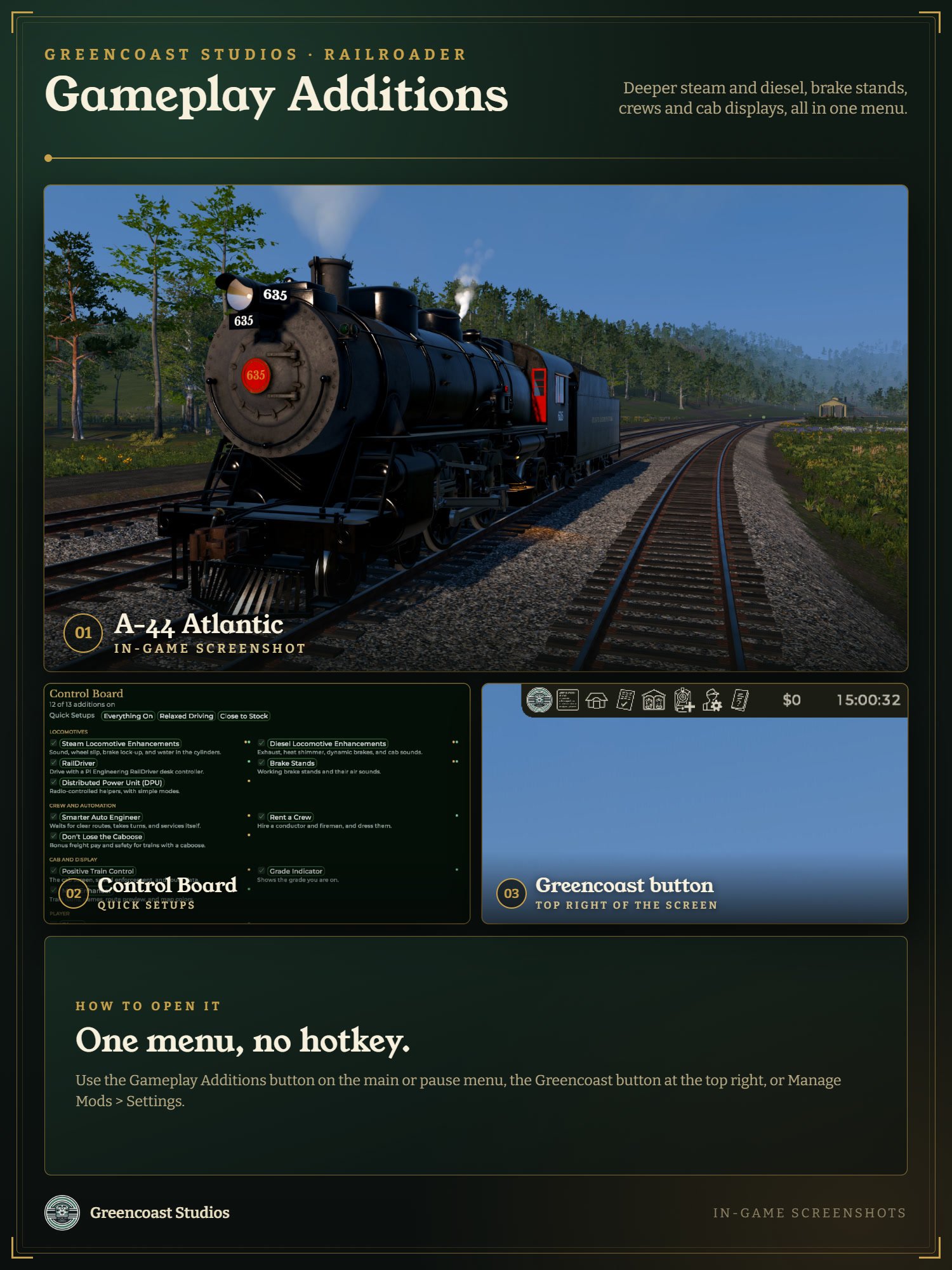 Image 1 of 10
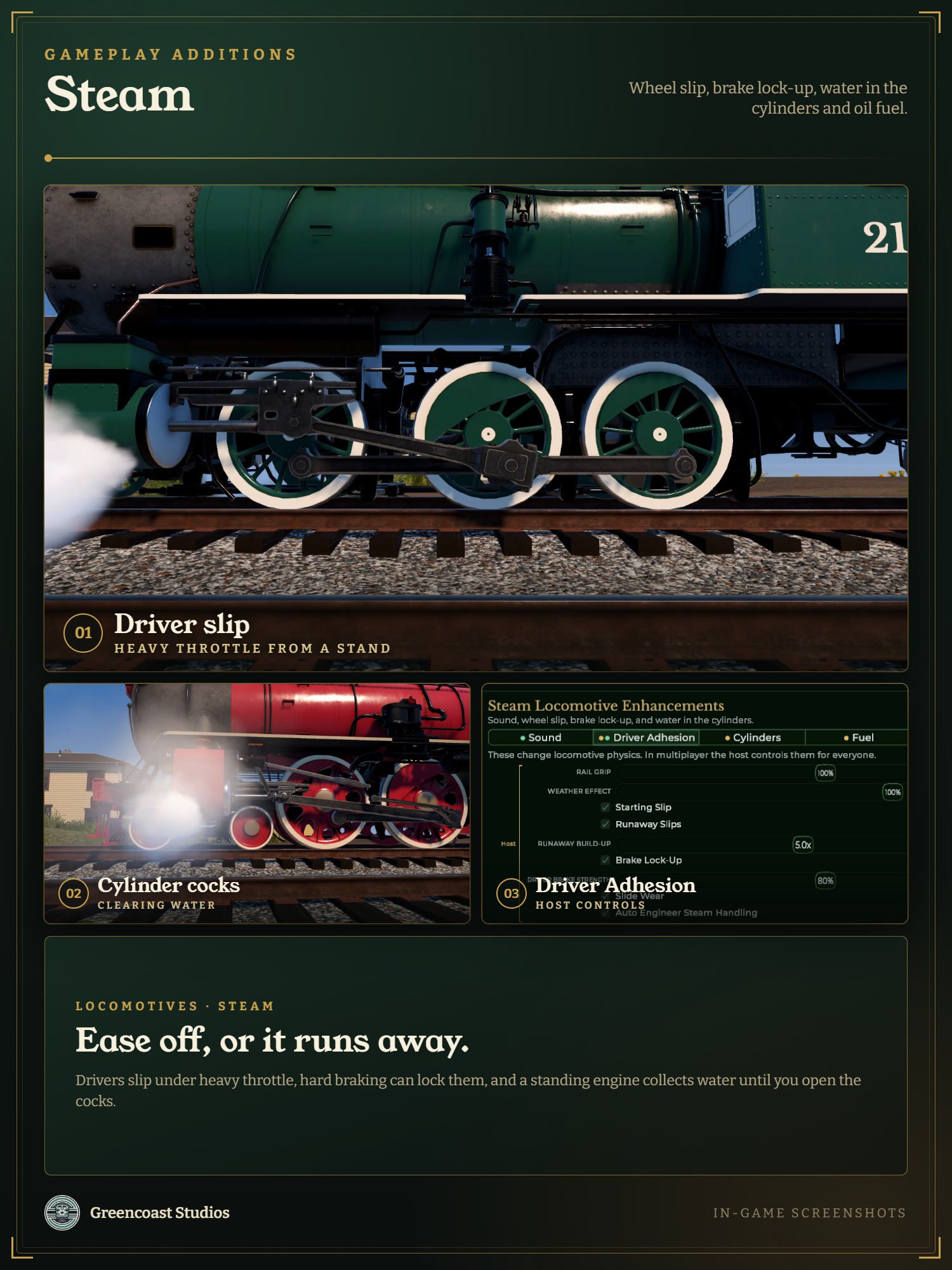 Image 2 of 10
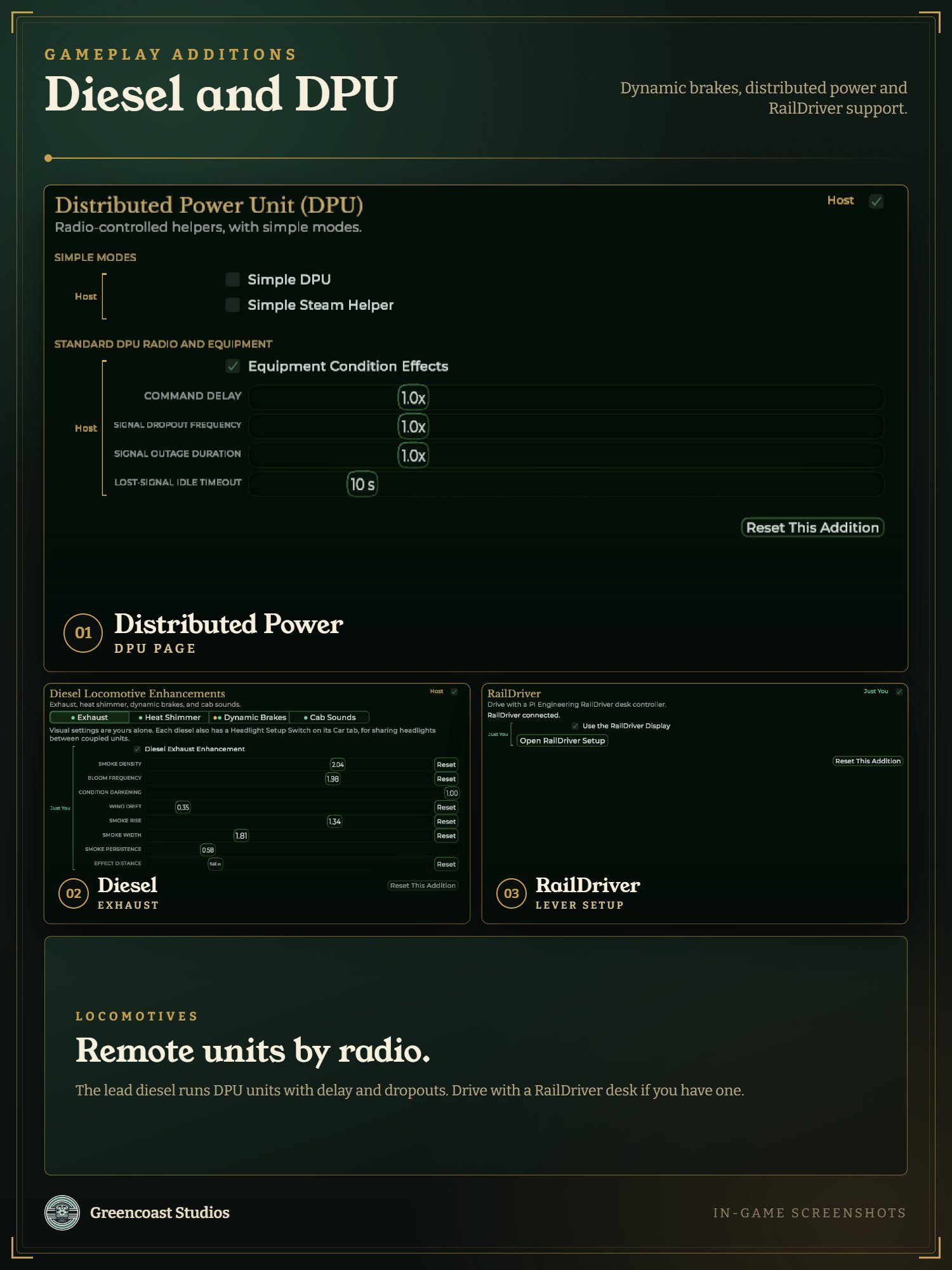 Image 3 of 10
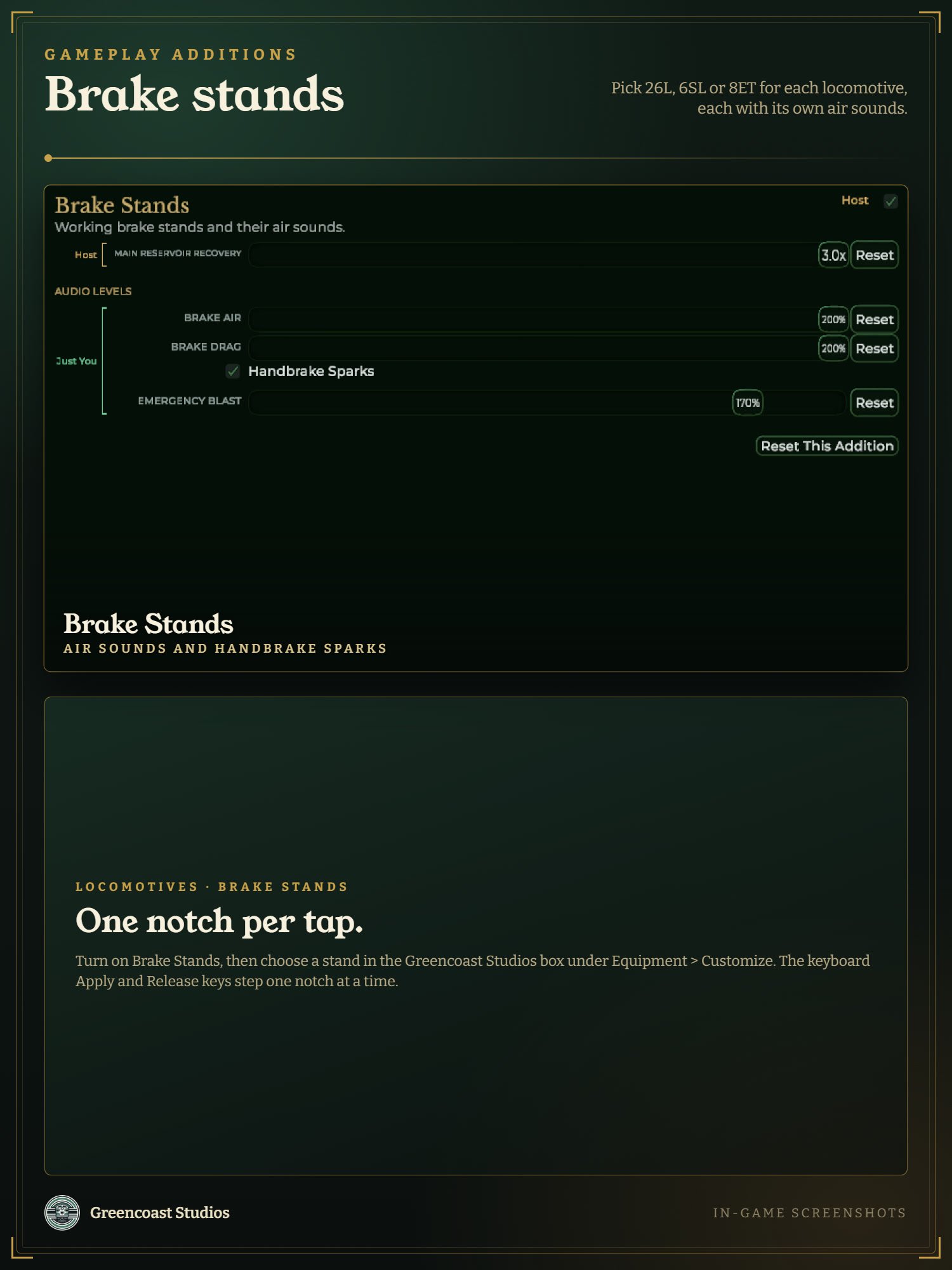 Image 4 of 10
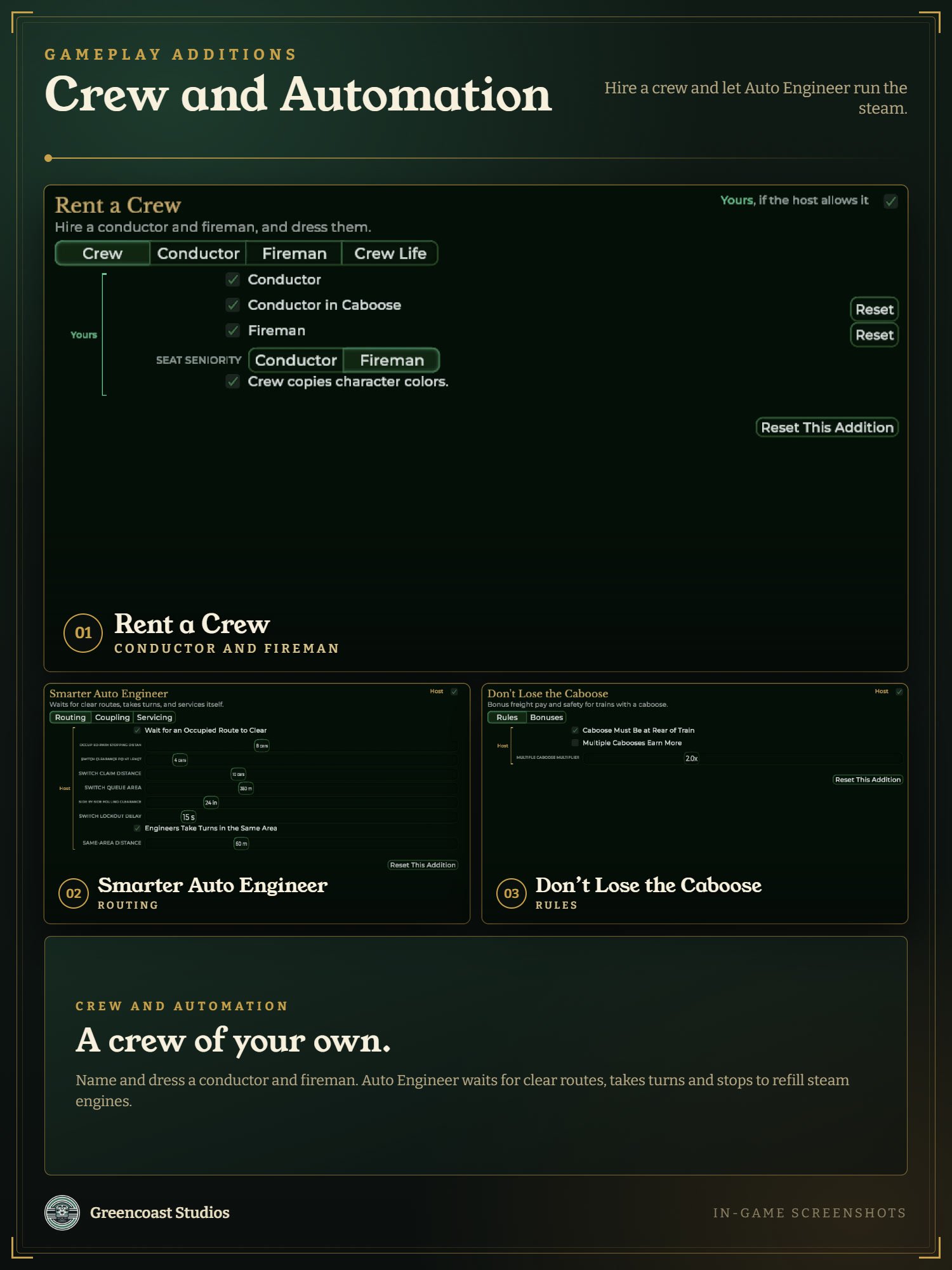 Image 5 of 10
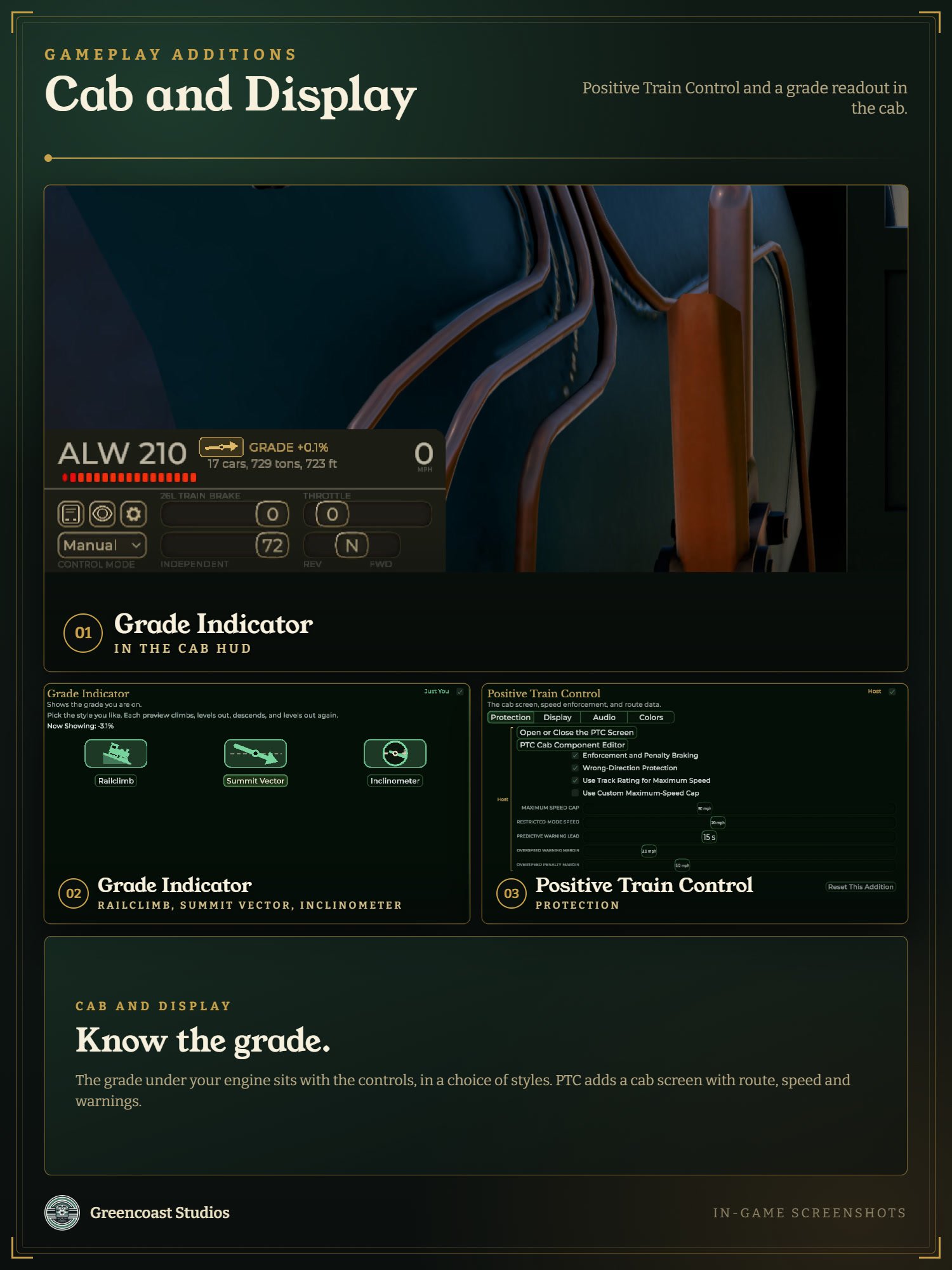 Image 6 of 10
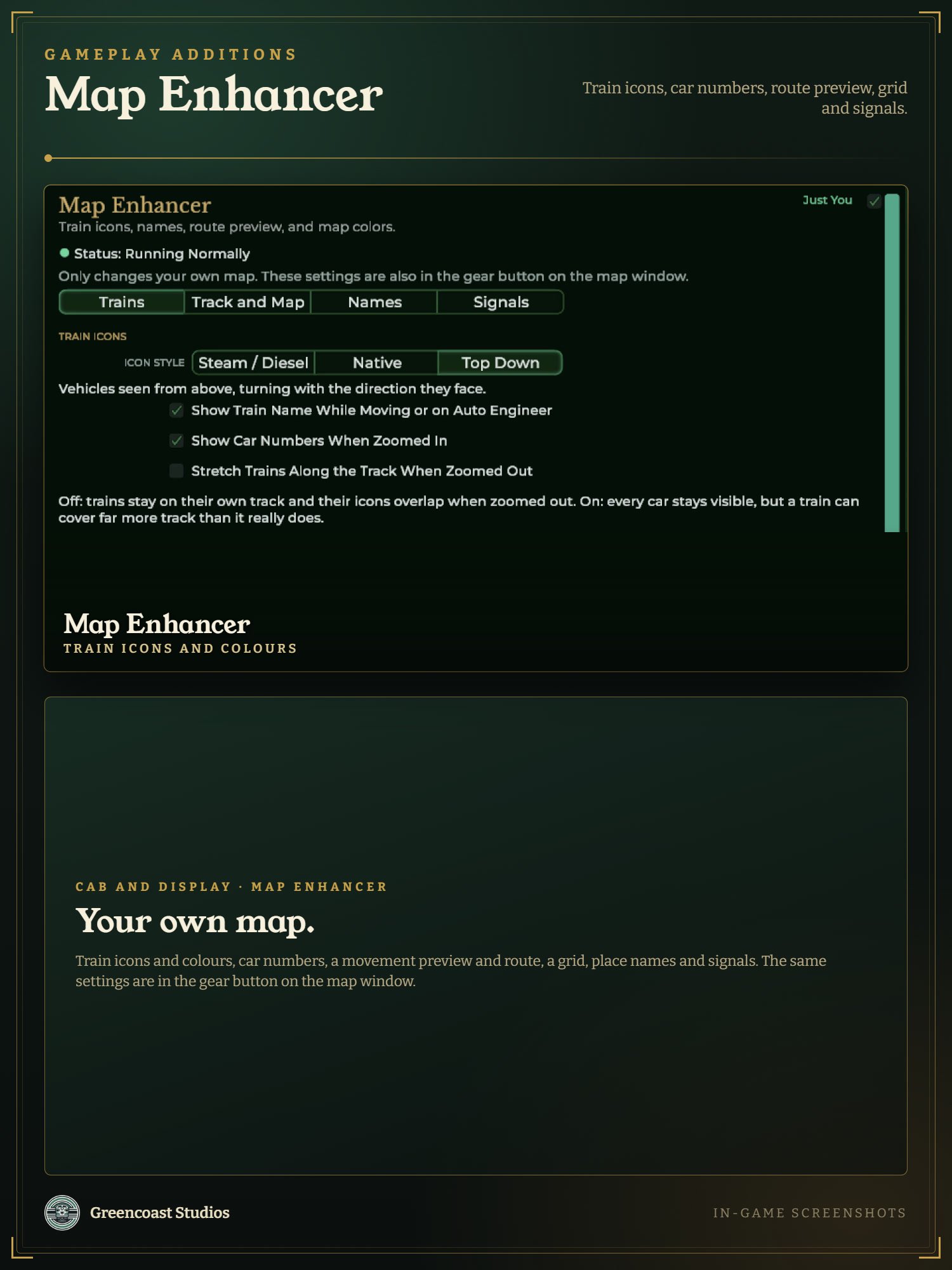 Image 7 of 10
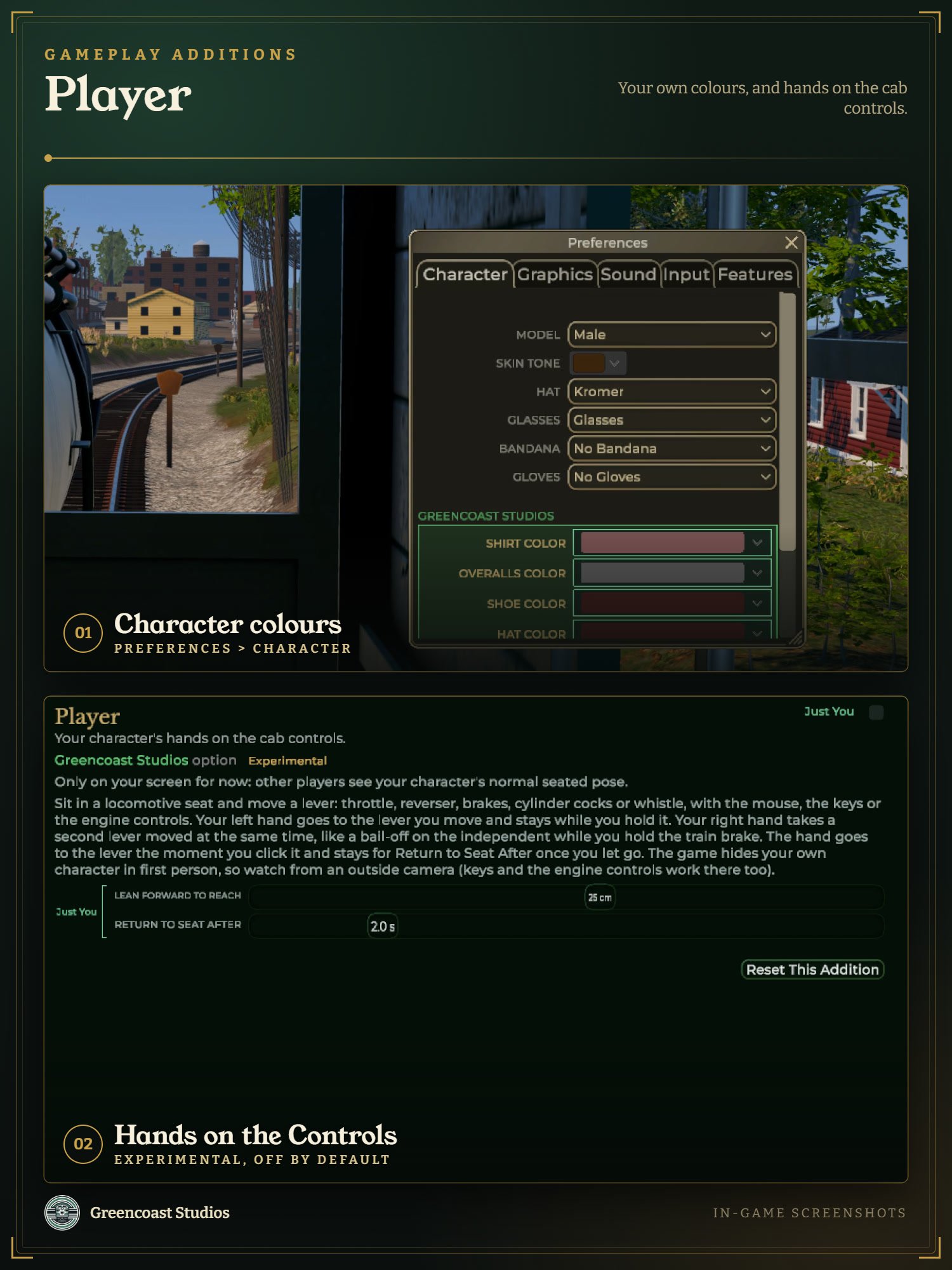 Image 8 of 10
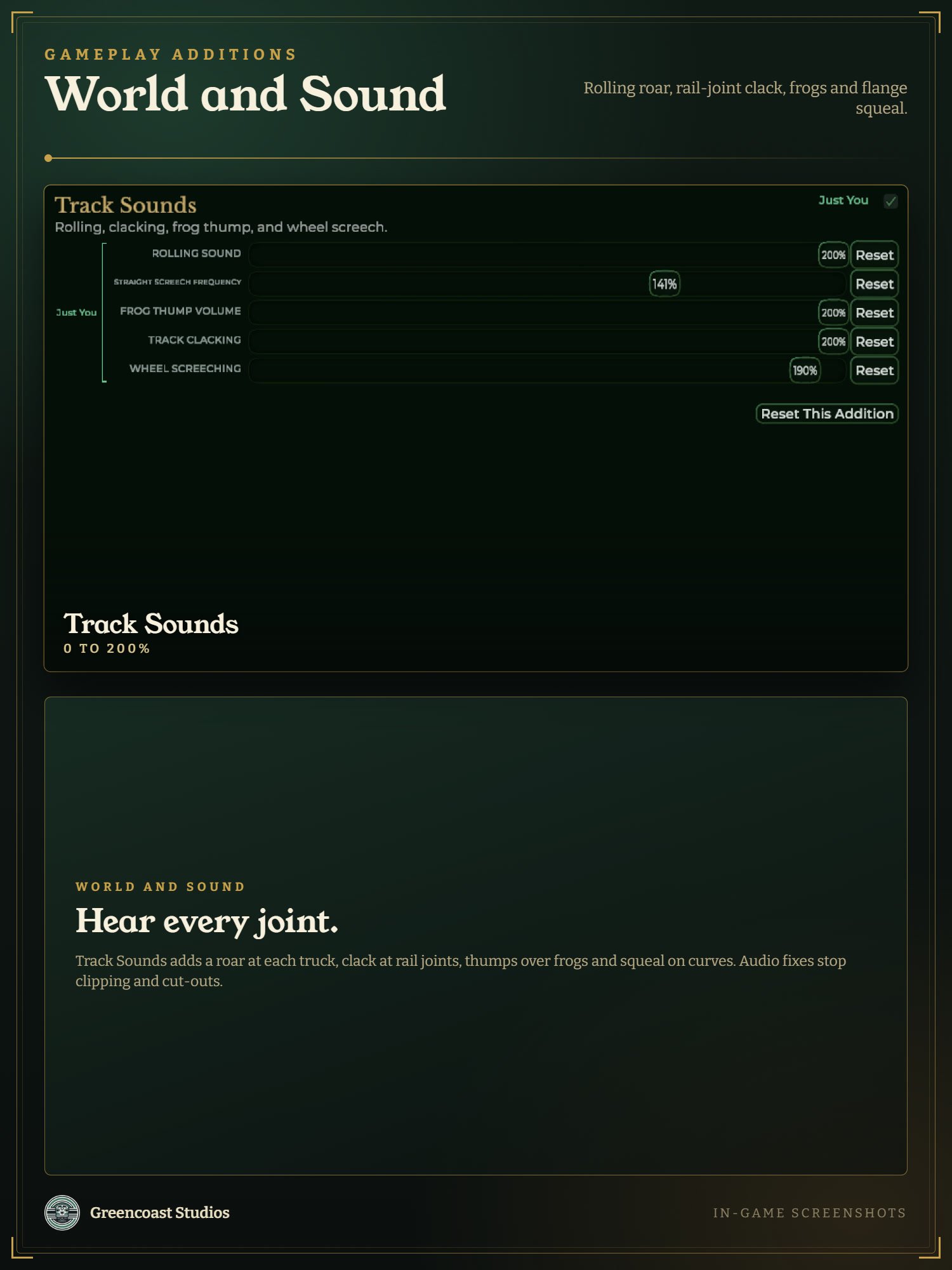 Image 9 of 10
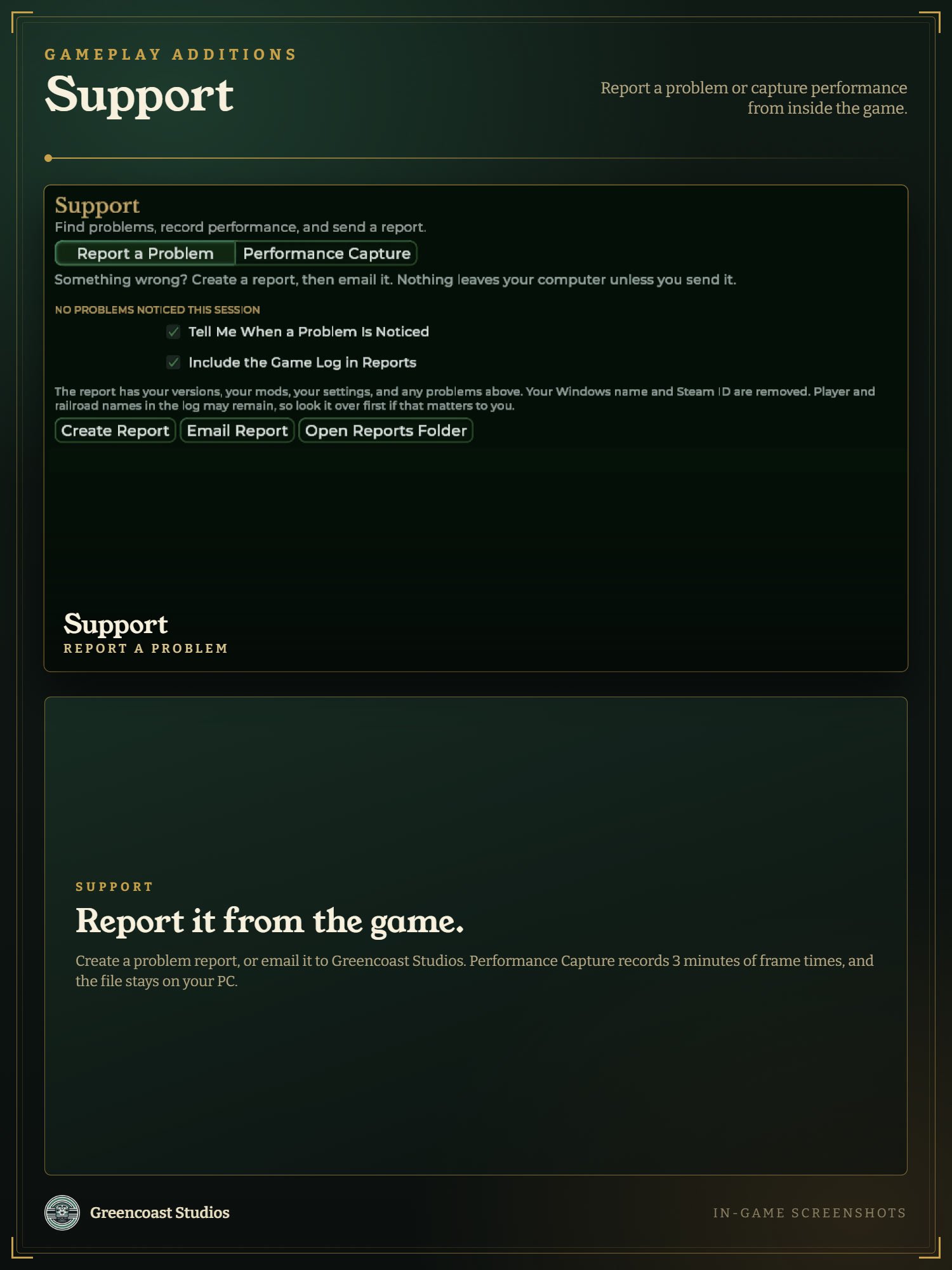 Image 10 of 10